 94f14495d1
Now, on my Mac laptop, if I am clocked into a task, shutting my
laptop, clocks out of the task before going to sleep.
63 KiB
General Org-Mode Configuration
A literate programming file for configuring org-mode and those files.
Use Package
Org is a large complex beast with a gazillion settings, so I discuss these later in this document.
  (use-package org
    ;; TODO: Using the latest org-mode
    ;; :straight (:type built-in)
    :mode (("\\.org" . org-mode))
    :init
    <<variables>>
    <<org-todo>>
    <<org-todo-clock>>
    <<ob-configuration>>
    <<html-exporting>>

    :config
    <<ha-org-leader>>
    <<visual-hook>>
    <<text-files>>
    <<org-font-lock>>
    <<no-flycheck-in-org>>
    <<ob-languages>>
    <<ob-graphviz>>
    <<ox-exporters>>
    <<org-return-key>>
    <<global-keybindings>>
    <<org-keybindings>>)
Initialization Section
Begin by initializing these org variables:
  (setq org-return-follows-link t
        org-adapt-indentation nil   ; Don't physically change files
        org-startup-indented t      ; Visually show paragraphs indented
        org-list-indent-offset 2
        org-edit-src-content-indentation 2 ; Doom Emacs sets this to 0,
                                          ; but uses a trick to make it
                                          ; appear indented.
        org-use-sub-superscripts '{}

        org-imenu-depth 4
        sentence-end-double-space nil   ; I jump around by sentences, but seldom have two spaces.

        org-html-validation-link nil
        org-export-with-sub-superscripts nil
        org-export-with-drawers nil
        org-export-with-author nil
        org-export-with-email nil
        org-export-with-date nil
        org-export-with-todo-keywords nil
        org-export-with-broken-links nil
        org-export-with-toc nil  ; Only for my hamacs publishing
        org-export-with-date nil
        org-export-with-title nil
        org-export-with-section-numbers nil
        org-export-with-creator nil
        org-export-with-smart-quotes t
        org-export-with-timestamps nil
        org-export-time-stamp-file nil
        org-export-date-timestamp-format "%e %B %Y"

        org-directory "~/personal"
        org-default-notes-file "~/personal/general-notes.txt"

        org-enforce-todo-dependencies t   ; Can't close a task without completed subtasks
        org-agenda-dim-blocked-tasks t
        org-log-done 'time

        org-completion-use-ido t
        org-outline-path-complete-in-steps nil
        org-src-tab-acts-natively t
        org-agenda-span 'day ; Default is 'week
        org-confirm-babel-evaluate nil
        org-src-fontify-natively t
        org-src-tab-acts-natively t

        ;; Updates the lastmod: when set in the file:
        time-stamp-active t
        time-stamp-start "#\\+lastmod:[ \t]*"
        time-stamp-end "$"
        time-stamp-format "[%04Y-%02m-%02d %a]")
Configuration Section
I pretend that my org files are word processing files that wrap automatically:
  (add-hook 'org-mode-hook #'visual-line-mode)
  (add-hook 'before-save-hook 'time-stamp nil)
Files that end in .txt are still org files to me:
  (add-to-list 'auto-mode-alist '("\\.txt\\'" . org-mode))

  (add-to-list 'safe-local-variable-values '(org-content . 2))
Note: Org mode files with the org-content variable setting will collapse two levels headers. Let's allow that without the need to approve that.
Better Return
Hitting the Return key in an org file should format the following line based on context. For instance, at the end of a list, insert a new item.
We begin with the interactive function that calls our code if we are at the end of the line.
  (defun ha-org-return ()
    "If at the end of a line, do something special based on the
   information about the line by calling `ha-org-special-return',
   otherwise, `org-return' as usual."
    (interactive)
    (if (eolp)
        (ha-org-special-return)
      (org-return)))
And bind it to the Return key:
(define-key org-mode-map (kbd "RET") #'ha-org-return)What should we do if we are at the end of a line?
- Given a prefix, call
org-returnas usual in an org file. - On a link, call
org-returnand open it. - On a header? Create a new header.
- In a table? Create a new row.
- In a list, create a new item.
I should break this function into smaller bits:
  (defun ha-org-special-return (&optional ignore)
    "Add new list item with RET.
  A double return on an empty element deletes it.
  Use a prefix arg to get regular RET."
    (interactive "P")
    (if ignore
        (org-return)
      (cond
       ;; Open links like usual
       ((eq 'link (car (org-element-context)))
        (org-return))

       ((and (org-really-in-item-p) (not (bolp)))
        (if (org-element-property :contents-begin (org-line-element-context))
            (progn
              (end-of-line)
              (org-insert-item))
          (delete-region (line-beginning-position) (line-end-position))))

       (t
        (org-return)))))
How do we know if we are in a list item? Lists end with two empty lines, so we need to make sure we are also not at the beginning of a line to avoid a loop where a new entry gets created with one empty line.
  (defun org-really-in-item-p ()
    "Return item beginning position when in a plain list, nil otherwise.
  Unlike `org-in-item-p', this works around an issue where the
  point could actually be in some =code= words, but still be on an
  item element."
    (save-excursion
      (let ((location (org-element-property :contents-begin (org-line-element-context))))
        (when location
          (goto-char location))
        (org-in-item-p))))
The org API allows getting the context associated with the current element. This could be a line-level symbol, like paragraph or list-item, but always when the point isn't inside a bold or italics item. You know how HTML distinguishes between block and inline elements, org doesn't. So, let's make a function that makes that distinction:
(defun org-line-element-context ()
  "Return the symbol of the current block element, e.g. paragraph or list-item."
  (let ((context (org-element-context)))
    (while (member (car context) '(verbatim code bold italic underline))
      (setq context (org-element-property :parent context)))
    context))
Tasks
I need to add a blocked state, and wouldn’t doing be better than in progress (you know, without a space):
(setq org-todo-keywords '((sequence "TODO(t)" "DOING(g)" "|" "DONE(d)")
                          (sequence "BLOCKED(b)" "|" "CANCELLED(c)")))
Mario Braganza had an interesting idea of starting the clock when a task changes to in progress:
  (defun ha-org-clock-todo-change ()
    "Called from hook `org-after-todo-state-change-hook'.
  Clock in if a task changes to DOING (i.e. IN_PROGRESS),
  and clocks out with any other state change."
    (if (string= org-state "DOING")
        (org-clock-in)
      (org-clock-out-if-current)))

  (add-hook 'org-after-todo-state-change-hook 'ha-org-clock-todo-change)
And I would like to have cute little icons for those states:
  (dolist (m '(org-mode org-journal-mode))
    (font-lock-add-keywords m                        ; A bit silly but my headers are now
                            `(("^\\*+ \\(TODO\\) "   ; shorter, and that is nice canceled
                               (1 (progn (compose-region (match-beginning 1) (match-end 1) "⚑") nil)))
                              ("^\\*+ \\(DOING\\) "
                               (1 (progn (compose-region (match-beginning 1) (match-end 1) "⚐") nil)))
                              ("^\\*+ \\(CANCELED\\) "
                               (1 (progn (compose-region (match-beginning 1) (match-end 1) "✘") nil)))
                              ("^\\*+ \\(BLOCKED\\) "
                               (1 (progn (compose-region (match-beginning 1) (match-end 1) "✋") nil)))
                              ("^\\*+ \\(DONE\\) "
                               (1 (progn (compose-region (match-beginning 1) (match-end 1) "✔") nil)))
                              ;; Here is my approach for making the initial asterisks for listing items and
                              ;; whatnot, appear as Unicode bullets ;; (without actually affecting the text
                              ;; file or the behavior).
                              ("^ +\\([-*]\\) "
                               (0 (prog1 () (compose-region (match-beginning 1) (match-end 1) "•")))))))
Meetings
I've notice that while showing a screen while taking meeting notes, I don't always like showing other windows, so I created this function to remove distractions during a meeting.
(defun meeting-notes ()
    "Call this after creating an org-mode heading for where the notes for the meeting
     should be. After calling this function, call 'meeting-done' to reset the environment."
      (interactive)
      (outline-mark-subtree)                             ; Select org-mode section
      (narrow-to-region (region-beginning) (region-end)) ; Show that region
      (deactivate-mark)
      (delete-other-windows)                             ; remove other windows
      (text-scale-set 2)                                 ; readable by others
      (fringe-mode 0)
      (message "When finished taking your notes, run meeting-done."))
Of course, I need an 'undo' feature when the meeting is over…
(defun meeting-done ()
      "Attempt to 'undo' the effects of taking meeting notes."
      (interactive)
      (widen)                    ; Opposite of narrow-to-region
      (text-scale-set 0)         ; Reset the font size increase
      (fringe-mode 1)
      (winner-undo))             ; Put the windows back in place
Searching
Came up with a great way to search a project for Org-specific files, and wrote an essay describing the approach and the code. The idea is that I can call find-file, but the list of files is not only the filename, but the Org #+title: as well as any tags located in the file.
  (use-package org-find-file
    :straight nil
    :config
    (ha-leader "f o" '("load org" . org-find-file)))
Now that my paragraphs in an org file are on a single line, I could use rg (or some other grep program), but being able to use an indexed search system, like mdfind on Macos, or recoll on Linux, gives better results than line-oriented search systems.
While mdfind is builtin to MacOS, we need to install recoll:
sudo apt install -y recollLet’s create operating-system functions the command line for searching:
  (defun ha-search-notes--macos (phrase path)
    "Return the indexed search system command on MACOS, mdfind.
  Including the parameters using the PHRASE on the PATH(s)."
    (let ((paths (if (listp path)
                     (mapconcat (lambda (p) (concat "-onlyin " p)) path " ")
                   (concat "-onlyin " path))))
      (format "mdfind %s -interpret %s" paths phrase)))

  (defun ha-search-notes--linux (phrase path)
    "Return the indexed search system command on Linux, recoll.
  Including the parameters using the PHRASE on the PATH(s)."
      (format "recoll -t -a -b %s" phrase))
And let’s see how that works:
(ha-search-notes--macos "crossway stream" "~/Notes")This function calls the above-mentioned operating-system-specific functions, but returns the matching files as a single string (where single quotes wrap each file, and all joined together, separated by spaces). This function also allows me to not-match backup files and whatnot.
  (defun ha-search-notes--files (phrase path)
    "Return an escaped string of all files matching PHRASE.
  On a Mac, the PATH limits the scope of the search."
    (let ((command (if (ha-running-on-macos?)
                       (ha-search-notes--macos phrase path)
                     (ha-search-notes--linux phrase path))))
      (->> command
           (shell-command-to-list)
           (--remove (s-matches? "~$" it))
           (--remove (s-matches? "#" it))
           (--map (format "'%s'" it))
(s-join " "))))Let’s see it in action:
(ha-search-notes--files "bread" '("~/personal"))':3:common/rclinit.cpp:391::Recoll 1.36.1 + Xapian 1.4.22 [/home/howard/.recoll]'
Returns this string:
"'/Users/howard.abrams/Notes/Sprint-2022-25.org' '/Users/howard.abrams/Notes/Sprint-2022-03.org' '/Users/howard.abrams/Notes/Sprint-2020-45.org' '/Users/howard.abrams/Notes/Sprint-2022-09.org' '/Users/howard.abrams/Notes/Sprint-2022-05.org' '/Users/howard.abrams/Notes/Sprint-2022-01.org' '/Users/howard.abrams/Notes/Sprint-2022-19.org'"
The ha-search-notes function prompts for the phrase to search, and then searches through the org-directory path, acquiring matching files, to feed to grep (and the grep function) to display a list of matches that I can jump to.
  (defun ha-search-notes (phrase &optional path)
    "Search files in PATH for PHRASE and display in a grep mode buffer."
    (interactive "sSearch notes for: ")
    (let* ((command   (if (ha-running-on-macos?) "ggrep" "grep"))
           (regexp    (string-replace " " "\\|" phrase))
           (use-paths (or path (list org-directory org-journal-dir)))
           (files     (ha-search-notes--files phrase use-paths))
           (cmd-line  (format "%s -ni -m 1 '%s' %s" command regexp files)))
      (grep cmd-line)))
Add a keybinding to the function:
(ha-leader "f n" '("find notes" . ha-search-notes))Misc
Babel Blocks
I use org-babel (obviously) and don’t need confirmation before evaluating a block:
  (setq org-confirm-babel-evaluate nil
        org-src-fontify-natively t
        org-src-tab-acts-natively t
        org-src-window-setup 'current-window)
Whenever I edit Emacs Lisp blocks from my tangle-able configuration files, I get a lot of superfluous warnings. Let's turn them off.
(defun disable-flycheck-in-org-src-block ()
  (setq-local flycheck-disabled-checkers '(emacs-lisp-checkdoc)))

(add-hook 'org-src-mode-hook 'disable-flycheck-in-org-src-block)
And turn on ALL the languages:
  (org-babel-do-load-languages 'org-babel-load-languages
                               '((shell      . t)
                                 (js         . t)
                                 (emacs-lisp . t)
                                 (clojure    . t)
                                 (python     . t)
                                 (ruby       . t)
                                 (dot        . t)
                                 (css        . t)
                                 (plantuml   . t)))
REST Web Services
Emacs has two ways to query and investigate REST-oriented web services. The ob-http adds HTTP calls to standard org blocks.
  (use-package ob-http
    :init
    (add-to-list 'org-babel-load-languages '(http . t)))
And let’s see how it works:
  GET https://api.github.com/repos/zweifisch/ob-http/languages
  Accept: application/json
  User-Agent: ${user-agent}
Results in:
{
  "Emacs Lisp": 15327,
  "Shell": 139
}
Another approach is ob-restclient, that may be based on the restclient project.
  (use-package ob-restclient
    :init
    (add-to-list 'org-babel-load-languages '(restclient . t)))
And let’s try this:
  GET https://api.github.com/repos/zweifisch/ob-http/languages
  Accept: application/vnd.github.moondragon+json
  User-Agent: ${user-agent}
Results in the same output:
{
  "Emacs Lisp": 15327,
  "Shell": 139
}
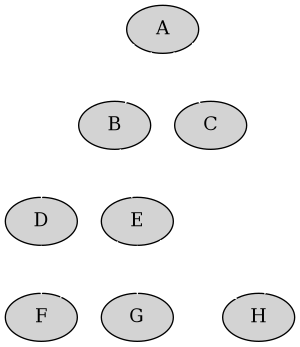
Graphviz
Using the graphviz project, create charts with textual instructions (code), and then rendered as an image. First setup Graphviz configuration using graphviz-dot-mode:
  (use-package graphviz-dot-mode
      :mode "\\.dot\\'"
      :init
      (setq graphviz-dot-indent-width 2
            graphviz-dot-auto-indent-on-newline t
            graphviz-dot-auto-indent-on-braces t
            graphviz-dot-auto-indent-on-semi t))
Next, add it to org-babel:
(add-to-list 'org-src-lang-modes '("dot" . "graphviz-dot"))For example:
  digraph G {
    graph [bgcolor=transparent];
    edge [color=white];
    node[style=filled];

    A -> B -> E;
    A -> D;
    A -> C;
    E -> F;
    E -> H
    D -> F;
    A -> H;
    E -> G;
  }
PlantUML
Need to install and configure Emacs to work with PlantUML. Granted, this is easier now that Org-Babel natively supports blocks of plantuml code. First, download the Jar.
curl -o ~/bin/plantuml.jar https://github.com/plantuml/plantuml/releases/download/v1.2022.4/plantuml-1.2022.4.jarAfter installing the plantuml-mode, we need to reference the location:
  (use-package plantuml-mode
    :straight (:host github :repo "skuro/plantuml-mode")
    :init
    (setq org-plantuml-jar-path (expand-file-name "~/bin/plantuml.jar")))
With some YASnippets, I have <p to start a general diagram, and afterwards (while still in the org-mode file), type one of the following to expand as an example:
-
activity - https://plantuml.com/activity-diagram-betastart
-
component - https://plantuml.com/component-diagram
-
deployment - https://plantuml.com/deployment-diagram
-
object - https://plantuml.com/object-diagram
-
sequence - https://plantuml.com/sequence-diagram
-
state - https://plantuml.com/state-diagram
-
timing - https://plantuml.com/timing-diagram
-
use-case - https://plantuml.com/use-case-diagram
You may be wondering how such trivial terms can be used as expansions in an org file. Well, the trick is that each snippets has a condition that calls the following predicate function, that make the snippets context aware:
(defun ha-org-nested-in-plantuml-block ()
  "Predicate is true if point is inside a Plantuml Source code block in org-mode."
  (equal "plantuml"
         (plist-get (cadr (org-element-at-point)) :language)))
Here is a sequence diagram example to show how is looks/works:
  @startuml
  !include https://raw.githubusercontent.com/ptrkcsk/one-dark-plantuml-theme/v1.0.0/theme.puml
  ' See details at https://plantuml.com/sequence-diagram
  Alice -> Bob: Authentication Request
  Bob --> Alice: Authentication Response

  Alice -> Bob: Another authentication Request
  Alice <-- Bob: Another authentication Response
  @enduml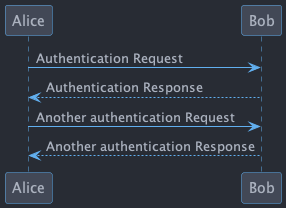
Pikchr
No, not Pikachu, but close. Unlike Graphviz and Plantuml, the Pikchr project makes boxes more positional and allows one to place the parts more precisely. Yet another steep learning curve.
Not sure if anyone has made a package, so we need to download and build locally:
  curl -o ~/bin/pikchr.c https://pikchr.org/home/raw/9aac00a46506e993db45b740f7a7957f8f381b37001e196199dfc25642c44f06?at=pikchr.c
  # gcc -c pikchr.c # to build the Pikchr library
  gcc -DPIKCHR_SHELL -o ~/bin/pikchr ~/bin/pikchr.c -lm # to build the pikchr command-line tool
Of course, since we are dealing with Emacs, where we assimilate any good idea. Johann Klähn created pikchr-mode:
  (use-package pikchr-mode
    :straight (:local-repo "~/src/pikchr-mode")
    ;; :straight (:host github :repo "kljohann/pikchr-mode")
    :custom
(pikchr-executable "~/bin/pikchr"))Let’s see this in action:
  bgcolor = 0x1d2021
  fgcolor = 0xeeeeee
  line; box "Hello," "World!"; arrow
Results in:

And this example shows off the syntax colorization:
  A: box "head" fit
  B: box "tail" fit
  C: box "something" with .sw at A.nw fit wid dist(A.w, B.e)
For the results:

Mermaid
At work, I’ve been integrating Mermaid into our documentation, foobar.
Assuming we have installed the Mermaid CLI:
npm install -g @mermaid-js/mermaid-cliWe edit the code with mermaid-mode:
  (use-package mermaid-mode
    :config
    (setq mermaid-mmdc-location (if (file-exists-p "/opt/homebrew")
              "/opt/homebrew/bin/mmdc"
            "/usr/local/bin/mmdc")))
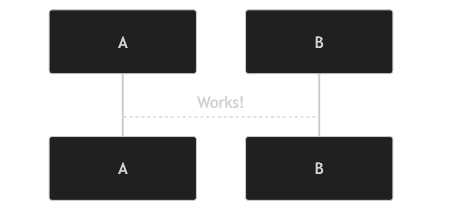
We can make Mermaid diagrams in Emacs Org files using ob-mermaid:
  (use-package ob-mermaid
    :config
    (setq ob-mermaid-cli-path mermaid-mmdc-location))
sequenceDiagram
A-->B: Works!
Next Image
When I create images or other artifacts that I consider part of the org document, I want to have them based on the org file, but with a prepended number. Keeping track of what numbers are now free is difficult, so for a default let's figure it out:
(defun ha-org-next-image-number (&optional prefix)
  (when (null prefix)
    (if (null (buffer-file-name))
        (setq prefix "cool-image")
      (setq prefix (file-name-base (buffer-file-name)))))

  (save-excursion
    (goto-char (point-min))
    (let ((largest 0)
          (png-reg (rx (literal prefix) "-" (group (one-or-more digit)) (or ".png" ".svg"))))
      (while (re-search-forward png-reg nil t)
        (setq largest (max largest (string-to-number (match-string-no-properties 1)))))
      (format "%s-%02d" prefix (1+ largest)))))
Keybindings
Global keybindings available to all file buffers:
  (ha-leader
    "o l" '("store link"  . org-store-link)
    "o x" '("org capture" . org-capture)
    "o C" '("clock out"   . org-clock-out))

  (ha-leader :keymaps 'org-mode-map
    "o h" '("go headings" . consult-org-heading)
    "o e" '("exports"     . org-export-dispatch)
    "o L" '("insert link" . org-insert-link)
    "o P" '("set property" .  org-set-property)
    "o g" '("set tags" .  org-set-tags-command)
    "o t" '("todo" . org-todo)
    "o T" '("list todos" .  org-todo-list)

    "o i"  '(:ignore t :which-key "insert")
    "o i i" '("item" .  org-insert-item)
    "o i I" '("insert id" .  org-id-get-create)
    "o i l" '("link" .  org-insert-link)
    "o i d" '("drawer" .  org-insert-drawer)
    "o i h" '("heading" .  org-insert-heading)
    "o i s" '("subheading" .  org-insert-subheading)

    "o o"  '(:ignore t :which-key "toggles")
    "o o h" '("heading" .  org-toggle-heading)
    "o o i" '("item" .  org-toggle-item)
    "o o x" '("checkbox" .  org-toggle-checkbox)
    "o o I" '("images" .  org-toggle-inline-images)
    "o o m" '("markup" . (lambda () (interactive)
                            (setq org-hide-emphasis-markers (not org-hide-emphasis-markers)) (font-lock-update)))

    "o /" '("agenda" . consult-org-agenda)
    "o '" '("edit" . org-edit-special)
    "o *" '("C-c *" . org-ctrl-c-star)
    "o +" '("C-c -" . org-ctrl-c-minus)

    "o c"  '(:ignore t :which-key "clocks")
    "o c i" '("clock in" . org-clock-in)
    "o c l" '("clock in last" . org-clock-in-last)
    "o c o" '("clock out" . org-clock-out)
    "o c c" '("cancel" . org-clock-cancel)
    "o c d" '("mark default task" . org-clock-mark-default-task)
    "o c e" '("modify effort" . org-clock-modify-effort-estimate)
    "o c E" '("set effort" . org-set-effort)
    "o c g" '("goto clock" . org-clock-goto)
    "o c r" '("resolve clocks" . org-resolve-clocks)
    "o c R" '("clock report" . org-clock-report)
    "o c t" '("eval range" . org-evaluate-time-range)
    "o c =" '("timestamp up" . org-clock-timestamps-up)
    "o c -" '("timestamp down" . org-clock-timestamps-down)

    "o d"  '(:ignore t :which-key "dates")
    "o d s" '("schedule" . org-schedule)
    "o d d" '("deadline" . org-deadline)
    "o d t" '("timestamp" . org-time-stamp)
    "o d T" '("inactive time" . org-time-stamp-inactive)


    "o b"  '(:ignore t :which-key "tables")
    "o b -" '("insert hline" . org-table-insert-hline)
    "o b a" '("align" . org-table-align)
    "o b b" '("blank field" . org-table-blank-field)
    "o b c" '("create teable" . org-table-create-or-convert-from-region)
    "o b e" '("edit field" . org-table-edit-field)
    "o b f" '("edit formula" . org-table-edit-formulas)
    "o b h" '("field info" . org-table-field-info)
    "o b s" '("sort lines" . org-table-sort-lines)
    "o b r" '("recalculate" . org-table-recalculate)
    "o b d"  '(:ignore t :which-key "delete")
    "o b d c" '("delete column" . org-table-delete-column)
    "o b d r" '("delete row" . org-table-kill-row)
    "o b i"  '(:ignore t :which-key "insert")
    "o b i c" '("insert column" . org-table-insert-column)
    "o b i h" '("insert hline" . org-table-insert-hline)
    "o b i r" '("insert row" . org-table-insert-row)
    "o b i H" '("insert hline ↓" . org-table-hline-and-move)

    "o n"  '(:ignore t :which-key "narrow")
    "o n s" '("subtree" . org-narrow-to-subtree)
    "o n S" '("tree -> win" . org-tree-to-indirect-buffer)
    "o n b" '("block"   . org-narrow-to-block)
    "o n e" '("element" . org-narrow-to-element)
    "o n w" '("widen"   . widen))
Bindings specific to org files:
  (when (fboundp 'evil-define-key)
    (evil-define-key '(normal motion operator visual)
      org-mode-map
      "gj" '("next heading" . #'org-forward-heading-same-level)
      "gk" '("prev heading" . #'org-backward-heading-same-level)
      "gb" '("next block" . #'org-next-block)
      "gB" '("prev block" . #'org-previous-block)))
Supporting Packages
Exporters
Limit the number of exporters to the ones that I would use:
(setq org-export-backends '(ascii html md texinfo odt))I have a special version of tweaked Confluence exporter for my org files:
  (use-package ox-confluence
    :after org
    :straight nil   ; Located in my "elisp" directory
    :config
    (ha-leader :keymaps 'org-mode-map
      "o E" '("to confluence"     . ox-export-to-confluence)))
HTML Style
I’m not afraid of HTML, but I like the idea of doing my HTML work in a Lisp-like way using the jack-html project:
  (use-package jack
    :straight (:host github :repo "tonyaldon/jack")
    :commands (jack-html))
So the Lisp code:
(jack-html '(:p "Hello there"))Returns the string:
<p>Hello there</p>
Splitting out HTML snippets is often a way that I can transfer org-formatted content to other applications.
  (use-package jack
    :after org
    :config
    (setq org-html-head-extra
          (jack-html `((:link (@ :rel "stylesheet"
                        :type "text/css"
                        :href "https://fonts.googleapis.com/css2?family=Literata:ital,wght@0,300;0,600;1,300;1,600&display=swap"))
                       (:link (@ :rel "stylesheet"
                        :type "text/css"
                        :href "https://fonts.googleapis.com/css2?family=Overpass:ital,wght@0,300;0,600;1,300;1,600&display=swap"))
                       (:link (@ :rel "stylesheet"
                        :type "text/css"
                        :href "https://fonts.googleapis.com/css2?family=Source+Code+Pro:ital,wght@0,200..900;1,200..900&display=swap"))
                       (:style ,(string-join '(
                        "body { font-family: 'Literata', sans-serif; color: #333; }"
                        "h1,h2,h3,h4,h5 { font-family: 'Overpass', sans-serif; color: #333; }"
                        "code { font-family: 'Source Code Pro'; color: steelblue }"
                        "pre { font-family: 'Source Code Pro'; background-color: #eee; border-color: #aaa; }"
                        "a { text-decoration-style: dotted }"
                        "@media (prefers-color-scheme: dark) {"
                        "  body { background-color: #1d1f21; color: white; }"
                        "  h1,h2,h3,h4,h5 { color: #fcca1b; }"
                        "  code { color: lightsteelblue; }"
                        "  pre { background-color: black; border-color: #777; }"
                        "  a:link { color: lightblue }"
                        "  a:visited { color: violet }"
                        "}")
                     hard-newline))))))
Focused Work
I've been working on my own approach to focused work,
  (use-package async)

  (use-package ha-focus
    :straight (:type built-in)
    :config
    (ha-leader
     "o f" '("begin focus" . ha-focus-begin)
     "o F" '("break focus" . ha-focus-break))
    :bind
    (("<f12>" . ha-focus-begin)
     ("S-<f12>" . ha-focus-interrupt)
     ("s-<f12>" . ha-focus-timer-left)))
Need to be able to clock out of a task even if no clock-in has occurred.
  (defun ha-clock-out ()
    "Safely clock out of the current task.
  This will not throw an error if no active clock exists."
    (interactive)
    (ignore-errors
      (org-clock-out)
      (message "Clocked out.")))
I call this function from my Hammerspoon configuration to clock out of a task when I close my laptop.
What was I working on? Opening the laptop after a break seldom answers that, so this reports whatever clock is still running, and when none is, the one I stopped last, which is the more likely question after a break.
  (defun ha-display-latest-clocked-task ()
    "Display the task clocked in now, or the one most recently clocked out."
    (interactive)
    (cond
     ((org-clocking-p)
      (message "Currently clocked in: %s"
               (substring-no-properties (org-clock-get-clock-string))))

     ((and org-clock-out-time
           (stringp org-clock-heading)
           (not (string-empty-p org-clock-heading)))
      (let ((seconds (float-time (time-subtract nil org-clock-out-time))))
        (message "Clocked out of \"%s\" %s ago" org-clock-heading
                 (if (< seconds 60)
                     "less than a minute"
                   (format-seconds "%D %H %M%z" seconds)))))

     (t (message "No task is currently clocked in."))))
The %z at the end of the format drops the larger units while they read zero, turning 0 days 0 hours 25 minutes into 25 minutes. It has nothing to lean on when every unit is zero, so the first minute gets phrased by hand:
Spell Checking
Let's hook some spell checking into org files, and actually all text files. I’m making this particularly delicious.
abbrev
First, we turn on abbrev-mode. While this package comes with Emacs, check out Mickey Petersen's overview of using this package for auto-correcting typos.
(setq-default abbrev-mode t)
In general, fill the list, by moving the point to the end of some word, and type C-x a g (or, in normal state, type SPC x d):
(ha-leader "x d" '("add abbrev" . kadd-global-abbrev))The idea is that you can correct a typo and remember it. Perhaps calling edit-abbrevs to making any fixes to that list.
jinx
Once upon a time, I used flyspell mode to highlight the misspelled words, and the venerable ispell for correcting. To be able to correct spelling mistakes from a distance, without navigation, I wrote a function that took advantage of Evil’s evil-prev-flyspell-error to jump back to the last spelling mistake.
Now, I’m using jinx, as it is the complete basket. It spellchecks based on the fontlock face and uses an external enchant program (to make spell checking fast and asynchronous). Like flymake, Jinx does on-the-fly spell checking of code comments and strings.
I keep jinx-correct bound to C-; à la flyspell because it is so darn helpful. Supports checking documents with mixed languages.
Requires the libenchant from the Enchant project, so on MacOS, I install it via:
brew install enchantAnd on Linux:
sudo apt install libenchant-2-devAnd the Emacs interface to that:
  (use-package jinx
    :straight (:host github :repo "minad/jinx" :files (:defaults "jinx-mod.c" "emacs-module.h"))
    :hook (emacs-startup . global-jinx-mode)
    :bind (("C-;" . jinx-correct-nearest)
           ("s-;" . jinx-correct-nearest)
           ([remap ispell-word] . #'jinx-correct))
    :config
    (ha-leader
      "s c"  '(:ignore t :which-key "spellcheck")
      "s c c" '("spellcheck nearest" . jinx-correct-nearest)
      "s c n" '("next" . jinx-next)
      "s c p" '("previous" . jinx-previous)
      "s c b" '("spellcheck buffer" . jinx-correct-all)))
Jinx works really good, as the mini-buffer allows you to use letters to filter the choice, and numbers (or Return) to select the choice. Selecting @ adds the word to your personal dictionary, and * adds it to the local words for the file (search for jinx-local-words). Also, it appears that calling jinx-correct goes back to the first incorrect spelling, letting you correct it, and then pops the point back. That is pretty slick.
It also, supposedly, fixes camelCase words. This doesn’t work in a text document. I appreciate that in org-mode files, text surrounded with = characters are no longer marked for misspellings.
Since this auto-correction needs to happen in insert mode, I have bound a few keys, including CMD-s and M-s (twice) to fixing this spelling mistake, and jumping back to where I am.
Thesaurus
Of course I need a thesaurus, and I'm installing powerthesaurus:
  (use-package powerthesaurus
    :config
    (ha-leader
      "s t"  '(:ignore t :which-key "thesaurus")
      "s t t" '("thesaurus" . powerthesaurus-lookup-dwim)
      "s t s" '("synonyms" . powerthesaurus-lookup-synonyms-dwim)
      "s t a" '("antonyms" . powerthesaurus-lookup-antonyms-dwim)
      "s t r" '("related" . powerthesaurus-lookup-related-dwim)
      "s t u" '("usages" . powerthesaurus-lookup-sentences-dwim)))
The key-bindings, keystrokes, and key-connections work well with a hyper-command, but to jump to specifics, I use a leader.
  (use-package powerthesaurus
    :bind ("s-t" . powerthesaurus-lookup-dwim))
Definitions
Since the definitions do not work, so let's use the define-word project:
  (use-package define-word
    :config
    (ha-leader :keymaps 'text-mode-map
      "s d"  '(:ignore t :which-key "dictionary")
      "s d d" '("define this word" . define-word-at-point)
      "s d a" '("define any word" . define-word)))
And what about a binding when I’m in insert mode:
  (use-package define-word
    :bind ("s-d" . define-word-at-point))
After my enamoring of Noah Webster’s 1913 dictionary (originally due to reading this essay by Mario Jason Braganza who referred to James Somers’ original 2014 blog entry), I easily followed the instructions from WebsterParser, a Github project, with the dictionary:
- Download the dictionary file.
- Unzip the archive … have a Finder window open to the
.dictionaryfile. - Open the
Dictionary.appprogram. - Select the menu entry, Dictionary –> File –> Open Dictionaries Folder
- Drag the downloaded
Websters-1913.dictionaryfile into the folder - Select the menu entry, Dictionary –> Dictionary –> Preferences
- Check the now last dictionary in the list
If you want to always see Webster’s results by default, go to the Dictionary app’s preferences and drag Webster’s to the top of the list.
Emacs version 28 added dictionary-search for looking up dictionaries online. With a dedicated buffer, this may be the easiest to read:
  (setq dictionary-server "dict.org")

  (ha-leader "s d o" '("search online dictionary" . dictionary-search))
Once in the dictionary buffer, acquiesce these keybindings:
qclose the dictionary buffersask for a new word to searchdsearch the word at point
Also note that the dictionary has links to other pages, so n and TAB jumps to the next link and RET opens that link.
Grammar and Prose Linting
Flagging clichés, weak phrasing and other poor grammar choices.
We are trying a lot of checkers, as each have their specialties. To do this, we chain them with a call to flycheck-add-next-checker:
write-good —> proselint —> textlint —> jinx (for spell checking)
Ignoring Code Blocks
None of these checkers understand Org, so each one grades my source blocks as if they were English. This becomes especially problematic when a Lisp quote turns off proselint for the rest of the file. I solved this issue in Markdown with Remark and a code-stripping plugin, but the Org checkers have no such pipeline.
Every checker gets the buffer through one of two functions: flycheck-process-send-buffer for the ones reading standard input, and flycheck-save-buffer-to-file for the ones handed a temporary file. Both work on whatever buffer happens to be current, so rather than wrap all three tools, I advise the pair to cover every checker in the chain, including any I add later.
The blanking replaces each character with a space instead of deleting it. Line numbers, columns, and character offsets all survive, so the positions the checkers report still line up with the real buffer:
  (defcustom ha-org-prose-ignored-blocks '("src" "example" "export")
    "Org block types whose contents the prose checkers should never see.
  Note the absence of `quote' and `verse', as those hold prose worth
  grading."
    :type '(repeat string)
    :group 'flycheck)

  (defun ha-org--blank-region (start end)
    "Replace each non-newline character between START and END with a space.

  To keep the line number positions correct, I can't just delete a code block,
  but need to replace the code block contents with innocuous spaces, but keep
  the newline characters."
    (save-excursion
      (goto-char start)
      (while (< (point) end)
        (let ((eol (min end (line-end-position))))
          (unless (= eol (point))
            (let ((len (- eol (point))))
              (delete-region (point) eol)
              (insert (make-string len ?\s)))))
        (forward-line 1))))

  (defun ha-org--blank-inline-code ()
    "Blank inline verbatim and code markup in the current buffer.
Only group 2 of `org-verbatim-re', the markup and its delimiters,
gets blanked, leaving the surrounding punctuation it also matches."
    (goto-char (point-min))
    (while (re-search-forward org-verbatim-re nil t)
      (ha-org--blank-region (match-beginning 2) (match-end 2))
      ;; Stop short of the trailing character, since it doubles as the
      ;; leading character of whatever construct comes next.
      (goto-char (match-end 2))))

  (defun ha-org-prose-only-text ()
    "Return this buffer's text with code blocks and inline code blanked."
    (let ((text (buffer-substring-no-properties (point-min) (point-max))))
      (with-temp-buffer
        (insert text)
        (goto-char (point-min))
        (let* ((case-fold-search t)
               (types (regexp-opt ha-org-prose-ignored-blocks t))
               (start-re (concat "^[ \t]*#\\+begin_" types "\\b")))
          (while (re-search-forward start-re nil t)
            (let ((type (match-string 1))
                  (start (match-beginning 0)))
              (when (re-search-forward
                     (concat "^[ \t]*#\\+end_" (regexp-quote type) "\\b.*$") nil t)
                (ha-org--blank-region start (point))))))
        ;; After the blocks, since their contents no longer contain markup.
        (ha-org--blank-inline-code)
        (buffer-string))))
Another issue I encounter (again solved differently for Markdown files using Remark) involves ignoring these grammar and proselinters for verbatim-formatted code. This allows me to write about just as a program, and not have it flagged.
Both advised functions read the current buffer, so the trick is to make a scratch buffer current that holds the blanked text. The derived-mode-p test happens before the temporary buffer exists, since that buffer is in fundamental-mode:
  (defun ha-flycheck--org-prose-only (orig &rest args)
    "Call ORIG with code blocks blanked, when checking an Org buffer."
    (if (derived-mode-p 'org-mode)
        (let ((text (ha-org-prose-only-text)))
          (with-temp-buffer
            (insert text)
            (apply orig args)))
      (apply orig args)))

  (advice-add 'flycheck-process-send-buffer :around #'ha-flycheck--org-prose-only)
  (advice-add 'flycheck-save-buffer-to-file :around #'ha-flycheck--org-prose-only)
This matters more than tidiness for proselint. Since version 0.16, it pairs quote characters across the whole document and silently discards any complaint landing between a pair. Lisp is full of quoted symbols and strings, so those pairings run wild: 80% of this file counts as “quoted”, and the warnings in it never appear. Blanking the code drops that figure to a fraction of a percent.
Writegood
The writegood-mode is effective at highlighting passive voice and weasel words.
For instance:
The cake was eaten by the children.
We install the write-good npm:
npm install -g write-goodAnd check that the following works:
write-good --text="So it is what it is."
Instead of hooking the writegood-mode to Org files, I hook it to flycheck instead.
Note that markdown-mode is absent from the list of modes, as Markdown files go through Remark instead, which runs write-good over the prose while ignoring the code blocks:
  (use-package flycheck
    :config
    (flycheck-define-checker write-good
                             "A checker for prose"
                             :command ("write-good" "--parse" source-inplace)
                             :standard-input nil
                             :error-patterns
                             ((warning line-start (file-name) ":" line ":" column ":" (message) line-end))
                             :modes (org-mode text-mode))

    (add-to-list 'flycheck-checkers 'write-good))
Proselint
The proselint project checks for poor English phrasings, clichés, and corporate-speak. For instance:
Let's touch base and circle back.
Install it on a Mac via:
brew install proselintAnd on Linux:
sudo apt install python3-proselint
Next, create a configuration file, ~/.config/proselint/config file, to turn on/off checks:
  {
    "checks": {
      "typography.diacritical_marks": false,
      "annotations.misc": false,
      "consistency.spacing": false
    }
  }
And tell flycheck to use Proselint:
  (use-package flycheck
    :config
    (add-to-list 'flycheck-checkers 'proselint)
    ;; And create the chain of checkers so that both work:
    (flycheck-add-next-checker 'write-good 'proselint))
Without this block tangling, write-good has no next checker, and since it sits at the front of flycheck-checkers, it becomes the one Org buffers select. Flycheck then stops there, and every checker chained behind it never runs.
Textlint
The textlint project comes with flycheck, and flags undefined acronyms (which annoyingly display at the beginning of the file), using the wrong punctuation, and “profane” words. For instance:
NASA launched a new rocket ball’s deep to the moon.
This requires an executable:
  sudo npm install -g textlint

  # And all the rules
  sudo npm install -g textlint-rule-alex
  sudo npm install -g textlint-rule-diacritics
  sudo npm install -g textlint-rule-en-max-word-count
  sudo npm install -g textlint-rule-max-comma
  sudo npm install -g textlint-rule-no-start-duplicated-conjunction
  sudo npm install -g textlint-rule-period-in-list-item
  sudo npm install -g textlint-rule-terminology
  sudo npm install -g textlint-rule-unexpanded-acronym
I create a configuration file in my home directory:
{
  "filters": {},
  "rules": {
    "abbr-within-parentheses": false,
    "alex": { "severity": "warning" },
    "common-misspellings": false,
    "diacritics": { "severity": "warning" },
    "en-max-word-count": { "severity": "warning" },
    "max-comma": { "severity": "warning" },
    "no-start-duplicated-conjunction": { "severity": "warning" },
    "period-in-list-item": { "severity": "warning" },
    "stop-words": false,
    "terminology": { "severity": "warning" },
    "unexpanded-acronym": { "severity": "warning" },
    "write-good": false
  }
}
Every rule carries an explicit severity, as textlint defaults each one to error, and flycheck-parse-eslint turns that into an Emacs error. Left alone, a quibble over a hyphen would outrank a misspelling. Note the object form: a rule set to true takes no options, so the severity has to replace that value rather than sit beside it.
Add textlint to the chain for Org files. The built-in checker hands textlint a temporary file named after the buffer, and textlint silently skips any file whose extension it does not know. Since .org is not on that list, it reports nothing and exits successfully, which looks identical to a clean buffer…ugh.
Piping the buffer in under a name textlint accepts avoids that. The stdin.txt name is cosmetic, as flycheck-parse-eslint overwrites it with the real buffer’s file name:
  (use-package flycheck
    :config
    (setq flycheck-textlint-config (format "%s/.textlintrc" (getenv "HOME")))

    (flycheck-define-checker org-textlint
      "A prose checker for Org files using textlint.

  Textlint skips files whose extension it does not know, and `.org' is
  not among them, so the buffer arrives on standard input under a name
  the text plugin accepts."
      :command ("textlint"
                (config-file "--config" flycheck-textlint-config)
                "--format" "json"
                "--plugin" "@textlint/text"
                "--stdin" "--stdin-filename" "stdin.txt")
      :standard-input t
      :error-parser flycheck-parse-eslint
      :modes (org-mode))

    (add-to-list 'flycheck-checkers 'org-textlint t)
    (flycheck-add-next-checker 'proselint 'org-textlint t))
Note: The text plugin has no notion of Org, but that no longer matters, since the advice above hands it prose with the code already blanked.
Spelling
I like correcting spelling through the jinx interface, but would also like to jump through misspellings using the flycheck UI.
Note: Since flycheck only reports problems (like a misspelling), I still require jinx-correct to repair the problem.
Jinx already does the work and leaves an overlay on each misspelling, so the checker collects them:
  (use-package flycheck
    :after jinx
    :config
    (defun ha-jinx--flycheck-errors (checker)
      "Return a `flycheck-error' for each misspelling jinx finds."
      ;; Jinx separates prose from code by font-lock face, and font-lock
      ;; only fontifies what has been displayed. Without this, the rest of
      ;; the buffer arrives faceless and every symbol reads as misspelled.
      (font-lock-ensure)
      (jinx--check-region (point-min) (point-max))
      (mapcar (lambda (ov)
                (let ((start (overlay-start ov))
                      (end (overlay-end ov)))
                  (flycheck-error-new-at-pos
                   start 'error
                   (format "Misspelled: %s"
                           (buffer-substring-no-properties start end))
                   :id "jinx"
                   :checker checker
                   :end-pos end)))
              (jinx--get-overlays (point-min) (point-max))))

    (flycheck-define-generic-checker 'jinx
      "A spell checker reporting what jinx and enchant already found."
      :start (lambda (checker callback)
               (condition-case err
                   (funcall callback 'finished (ha-jinx--flycheck-errors checker))
                 (error (funcall callback 'errored (error-message-string err)))))
      ;; Without jinx enabled there are no dictionaries to ask.
      :predicate (lambda () (bound-and-true-p jinx-mode))
      :modes '(org-mode text-mode markdown-mode gfm-mode))

    (add-to-list 'flycheck-checkers 'jinx t)
    (flycheck-add-next-checker 'org-textlint 'jinx t))
Note that jinx underlining the words itself, on top of what flycheck now draws. Turning that off would mean would apply that everywhere — including the programming buffers where this prose-chain never runs, and I would need jinx’s flagging. In other words, the doubled underline seems the smaller cost.
Perfect Sentence
Jordan Peterson's writing app, Essay, inspired Chris Malorana’s video tutorial showing the ability to extrude a single sentence into another buffer, edit different versions of that sentence, and replace one version into the original buffer. Similar to how org-mode edits blocks.
Thought I might work on it, but I want my version more resilient and not as dependent on the context.
When we create a new buffer, we set the following buffer-local variables, so we know where to return:
  (defvar-local ha-sentence-buffer nil
    "The name of the buffer to return when completed.")
  (defvar-local ha-sentence-begin nil
    "The beginning position in the original buffer to replace text.")
  (defvar-local ha-sentence-end nil
    "The ending position in the original buffer to replace text.")
My first thought is how to select the sentence. Sure, sometimes that should be the region, but we can also use the help:bounds-of-thing-at-point to define the start and the end of the current sentence:
  (defun ha-sentence--select-region (type-of-thing &optional start end)
    "Return a tuple of the start and end of the selected sentence."
    (cond
     ((region-active-p) (cons (region-beginning) (region-end)))
     ((and start end)   (cons start end))
     (t                 (bounds-of-thing-at-point type-of-thing))))
In the original buffer, we want to edit a sentence, but in the editing buffer, a single sentence may expand to more than one, so we need to change whether we select a 'sentence or a 'defun (for a paragraph).
With this function, we can call destructuring-bind to define what section we want to edit by assigning the start and end values. Now we create another buffer window, set the local variables, and insert the region/sentence we requested:
  (defun ha-sentence-break (&optional start end)
    "Break a sentence out and work it in a new buffer.
  We base the chosen sentence chosen on the location of a point,
  or the active region."
    (interactive)
    (cl-destructuring-bind (start . end)
         (ha-sentence--select-region 'sentence start end)
      (let ((orig-mode major-mode)
            (orig-buffer (current-buffer))
            (orig-sentence (buffer-substring-no-properties start end)))

        (switch-to-buffer-other-window "**sentence-breakout**")
        (funcall orig-mode)
        (ha-sentence-buffer-mode)

        ;; Store some breadcrumbs so we can return where we left off:
        (setq-local ha-sentence-buffer orig-buffer
                    ha-sentence-begin start
                    ha-sentence-end end)
        (erase-buffer)
        (insert orig-sentence)

        ;; Because we might want to duplicate the sentence in the
        ;; buffer, let's put it on the kill ring:
        (kill-new orig-sentence))))
With the new buffer displayed, we show the sentence to edit, with the idea to write different versions of that sentence. When we have the version we like, we hit C-c C-c which calls ha-sentence-choose to choose the version that replaces the old one. But what if, during the editing process, we create more than one sentence?
In that case, we need to select the text before hitting the C-c C-c sequence. The buffer-local variables tell us which buffer to return, and what text to replace.
  (defun ha-sentence-choose (&optional start end)
    "Choose a sentence and go back to the other window."
    (interactive)

    ;; By default, our "region" is a paragraph using 'defun symbol of `thing-at-point'
    ;; It doesn't work on the last sentence if it doesn't include a
    ;; newline, so hackily, we insert one.
    (save-excursion
      (goto-char (point-max))
      (insert "\n"))

    (cl-destructuring-bind (start . end) (ha-sentence--select-region 'defun start end)
      (let ((chosen-sentence (buffer-substring-no-properties start end))
            (orig-buffer     ha-sentence-buffer)
            (orig-start      ha-sentence-begin)
            (orig-end        ha-sentence-end))

        (kill-buffer-and-window)
        (switch-to-buffer orig-buffer)
        (delete-region orig-start orig-end) ; Or call `kill-region' to put on clipboard?
        (insert chosen-sentence))))
The kill-region function takes the original text and places it on the kill-ring (the clipboard). But since we already copied that when we created the buffer, we call delete-region instead. If we felt like we made a mistake, we can undo the changes.
With my limited experience, I seldom replace the sentence. Instead, I want to copy the sentence and work on that:
  (defun ha-sentence-duplicate ()
    (interactive)
    (let ((current (thing-at-point 'defun)))
      (goto-char (point-max))
      (insert "\n\n")
      (let ((starting-point (point)))
        (insert current)
        (goto-char starting-point))))
When creating this new editing buffer, we need keybindings that exist for this buffer, in other words, a minor mode:
  (defvar ha-sentence-buffer-mode-map (make-sparse-keymap) "Keymap for `my-mode'.")
  (define-key ha-sentence-buffer-mode-map (kbd "C-c C-c") #'ha-sentence-choose)
  (define-key ha-sentence-buffer-mode-map (kbd "C-c C-k") #'kill-buffer-and-window)
  (define-key ha-sentence-buffer-mode-map (kbd "C-c C-d") #'ha-sentence-duplicate)

  (define-minor-mode ha-sentence-buffer-mode
    "Toggle the Perfect Sentence mode.
  Interactively with no argument, this command toggles the mode.
  A positive prefix argument enables the mode, any other prefix
  argument disables it.  From Lisp, argument omitted or nil enables
  the mode, `toggle' toggles the state.

  When this mode is enabled, `C-c C-c' calls `ha-sentence-choose',
  and `C-c C-k' cancels and buries the buffer."
    ;; :interactive nil
    :init-value nil
    :lighter " PS"
:keymap ha-sentence-buffer-mode-map)Let’s bind a couple key sequences for Emacs mode:
(global-set-key (kbd "M-s b") 'ha-sentence-break)I am making this global, as it may be nice in both org-mode and programming modes.
And something else while in Evil mode:
(ha-leader "x b" '("edit sentence" . ha-sentence-break))While Malorana might get around to turning his code into a package, new features need to include:
- Adding an overlay to the original text, help:org-src–make-source-overlay
Distraction-Free Writing
Christopher Fin's essay inspired me to clean my writing room.
Write-room
For a complete focused, distraction-free environment, for writing or concentrating, I'm using Writeroom-mode:
  (use-package writeroom-mode
    :hook (writeroom-mode-disable . winner-undo)
    :init
    (ha-leader "t W" '("writeroom" . writeroom-mode))
    (ha-leader :keymaps 'writeroom-mode-map
      "=" '("adjust width" . writeroom-adjust-width)
      "<" '("decrease width" . writeroom-decrease-width)
      ">" '("increase width" . writeroom-increase-width))
    :bind (:map writeroom-mode-map
                ("C-M-<" . writeroom-decrease-width)
                ("C-M->" . writeroom-increase-width)
                ("C-M-=" . writeroom-adjust-width)))
Olivetti
The olivetti project sets wide margins and centers the text. It isn’t better than Writeroom, but, it works well with Logos (below).
  (use-package olivetti
    :init
    (setq-default olivetti-body-width 100)
    (ha-leader "t O" '("olivetti" . olivetti-mode))
    :bind (:map olivetti-mode-map
                ("C-M-<" . olivetti-shrink)
                ("C-M->" . olivetti-expand)
                ("C-M-=" . olivetti-set-width)))
Logos
Trying out Protesilaos Stavrou’s logos project as a replacement for Writeroom-mode:
  (use-package logos
    :straight (:host gitlab :repo "protesilaos/logos")
    :init
    (setq logos-outlines-are-pages t
          logos-outline-regexp-alist
          `((emacs-lisp-mode . "^;;;+ ")
            (org-mode . "^\\*+ +")
            (t . ,(or outline-regexp logos--page-delimiter))))

    ;; These apply when enabling `logos-focus-mode' as buffer-local.
    (setq-default logos-hide-mode-line t
                  logos-scroll-lock nil
                  logos-indicate-buffer-boundaries nil
                  logos-buffer-read-only nil
                  logos-olivetti t)
    :config
    (ha-leader "t L" '("logos" . logos-focus-mode))
    (define-key global-map [remap narrow-to-region] #'logos-narrow-dwim)

    :general
    (:states 'normal
             "g [" '("back page" . logos-backward-page-dwim)
             "g ]" '("next page" . logos-forward-page-dwim)))